


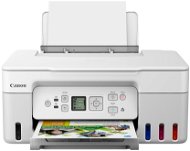
Reviews Canon PIXMA G3470 white
Interested in reviews of Canon PIXMA G3470 white? It got 4.6 out of 5 stars from our customers. Find specific customer reviews of Canon PIXMA G3470 white below. We will appreciate if you also share your experiences with Canon PIXMA G3470 white after purchasing.
User Reviews

Anonymous customer
Rated 30/01/2025, variant Canon PIXMA G3470 white
Verified purchase
It prints and scans without problems.
In Xubuntu 24.04 it runs effortlessly even over wifi.
Heavier, bigger, a little noisy.
0 ×Report
Automatic translation
Petr, Těrlicko - Hradiště
Rated 21/01/2025, variant Canon PIXMA G3470 white
Verified purchase - review from a price comparison website
Supr
Sometimes the paper runs empty through the printer by itself
0 ×Report
Automatic translation
Tereza, Brno
Rated 09/10/2024, variant Canon PIXMA G3470 white
Verified purchase
I recommend the product, I deduct a star only for the high noise of the paper feeder
price
refilling ink
appearance
backlit display
easy installation on MAC OS
A4 high resolution print speed = 69 seconds
also works with alternative inks, it is necessary to fill with a syringe but
noise level
the need to buy waste tanks once in a while
0 ×Report
Automatic translation

Lukáš, Praha 5
Rated 12/07/2023, variant Canon PIXMA G3470 white
Verified purchase
I was buying for my mom, so just after I helped her plug it in and compare it with my G3420.
It looks nice (it was really nice)
Uses good bottles where you don't have to worry about spilling or missing (blue only fits blue)
The display is small, but backlit! Compared to the previous generation haha.
It prints well for its price. With cash back for 3 500 Kc and money Canon sent within two weeks to the account. It's really paying off.
Supplied with full refills, one of each. Which lasts for about 2000 A4 text + about 50 A4 photos, maybe more, but the price of ink is good.
Even at 5 grand, it's a good buy. They should also sell the used ink tank with it, so it will last at least 3-6 years. I personally have the G3420 (previous model) for 2 years and I am quite satisfied.
Print speed is not extra, hold it is not a laser. But for home use I think it is better if you print less often, you can "waste" ink and print your grandmother a photo from the holiday.
The paper holder is in one piece and can't be pushed in the back. When paper is inserted, the top of the printer is not a flat surface, so you can't put something on it nicely.
It won't support double-sided printing on a Mac, because it can only do simplex (for Windows, the driver is like this, remove and flip the paper). You can get around it on a Mac, but it's a bit of a hassle.
When you print a photo on plain paper, you have to print it with a border and the highest quality and it still won't be the same. I recommend buying photo paper. If nothing else, at least the HR 101 (but you can't print borderless on that one either). Borderless printing on plain paper uses less ink, so it has faded colors, the printer avoids breakage of components I understand.
0 ×Report
Automatic translation

Jaroslav, Praha 5
Rated 13/01/2026, variant Canon PIXMA G3470 black
Verified purchase
Photo printing on Canon photo papers (glossy B6) seems to me to be a bit darker than the master, but maybe it can still be tweaked somehow, I have the printer for a short time. When printing in colour on plain A4 paper, you can see the banding, you just need better photo papers for printing images. But even so, the normal printing of documents (invoice, letter, mail, etc. ), on ordinary office paper, very good.
Quick and easy installation on Windows 11, the instructions are very simple and clear and are in English.
Full ink bottles included in the price of the printer, no dodgy "starter" cartridges!
Very fast printing of common documents.
Very fast and overall pretty good document scanning. Excellent for home use.
There is no USB cable included with the printer.
0 ×Report
Automatic translation

Lukáš, VYŠKOV
Rated 06/07/2025, variant Canon PIXMA G3470 black
Verified purchase
I bought it, I saw it, and I can't stop wondering
But if you give a check print once every 2 days, it works fine.
I've also printed larger volumes of colour and black and white. I have had the printer for about half a year and the cartridges are 3/4 full.
And what's cool and I didn't expect it black and the colors are in the package.
One big downside is that if you don't print for a long time, your cartirge can dry out. (I used earplugs and water, it helped, but I can't recommend it)
0 ×Report
Automatic translation
Jaroslav, Dambořice
Rated 18/01/2025, variant Canon PIXMA G3470 red
Verified purchase - review from a price comparison website
The nonsensical controls make it useless. I' ll probably come back.
He makes nice copies, even copies of photos.
Very complicated controls. Even if I just want to make a copy, I have to click through to this function on the pidi display.
Setting up wireless printing is beyond the power of the average user.
0 ×Report
Automatic translation

Petr, Brno
Rated 24/11/2024, variant Canon PIXMA G3470 black
Verified purchase - review from a price comparison website
The product description states "double-sided printing", but only an experienced user will understand that this is manual page turning.
Lack of automatic DUPLEX duplex printing
0 ×Report
Automatic translation
Anonymous customer
Rated 13/10/2024, variant Canon PIXMA G3470 black
Verified purchase
It's cheap, but it doesn't work.
Economical tank system
When installing, it got completely stuck and says wait for about an hour. There's no way to reset it.
Filling the paper unfashionably from the back from the top, the paper gets dusty and takes it inside. How long do you think this will work
The instructions do not describe the buttons, so you have no idea what they are for.
The display is miniature in size, it cannot be read.
0 ×Report
Automatic translation

Pavel, Praha
Rated 12/10/2024, variant Canon PIXMA G3470 red
Verified purchase
simplicity of operation
nice photos
good press
nothing so far
0 ×Report
Automatic translation
