


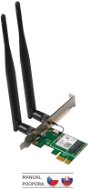
Reviews Tenda E12 Wireless AC1200 PCI Express Adapter, Windows 10, Auto-install
Interested in reviews of Tenda E12 Wireless AC1200 PCI Express Adapter, Windows 10, Auto-install? It got 4.2 out of 5 stars from our customers. Find specific customer reviews of Tenda E12 Wireless AC1200 PCI Express Adapter, Windows 10, Auto-install below. We will appreciate if you also share your experiences with Tenda E12 Wireless AC1200 PCI Express Adapter, Windows 10, Auto-install after purchasing.
User Reviews

Daniel, Praha 10 - Hostivař
Rated 16/02/2025, variant Tenda E12 Wireless AC1200 PCI Express Adapter, Windows 10, Auto-install
Verified purchase
All ok
0 ×Report
Automatic translation

Radim, Praha
Rated 02/11/2023, variant Tenda E12 Wireless AC1200 PCI Express Adapter, Windows 10, Auto-install
Verified purchase
It works
Adjustable antennas
5G is broken in my case when the 5G network doesn't even appear
0 ×Report
Automatic translation

Jan, Praha 6
Rated 08/05/2022, variant Tenda E12 Wireless AC1200 PCI Express Adapter, Windows 10, Auto-install
Verified purchase
easy, fast installation
0 ×Report
Automatic translation

Jiří, Říčany
Rated 17/02/2022, variant Tenda E12 Wireless AC1200 PCI Express Adapter, Windows 10, Auto-install
Verified purchase
when inserted into the PCIe slot, the card proves to be a problem in that it needs drivers. Specifically:
This device is not configured correctly. (Code 1) The system cannot find the file specified.
To find a driver for this device, click the Update Driver button.
during installation reports:
Windows found drivers for your device, but an error occurred while trying to install them.
The system cannot find the specified file after this step, the card reports that it does not have the drivers installed. throws the same error when trying to install them
the driver cannot be installed, so it is unusable and non-functional
0 ×Report
Automatic translation
