Try our cookiesAlza.cz a. s., Company identification number 27082440, uses cookies to ensure the functionality of the website and with your consent also to personalisage the content of our website. By clicking on the “I understand“ button, you agree to the use of cookies and the transfer of data regarding the behavior on the website for displaying targeted advertising on social networks and advertising networks on other websites.
We use 8 categories of cookies on our website:
Technical cookies
These are strictly necessary for the functioning of the website and the features you choose to use. Without them, our website would not work; you wouldn't be able to log in to your user account, for example.
Functionality cookies
These cookies allow us to remember your basic choices and improve the user experience. These include remembering your preferred language or allowing you to stay logged in permanently.
Social media cookies
These cookies allow us to easily link you to your social media profile and, for example, allow you to share products and services with your friends and family.
Content personalisation
These cookies allow us to show you content and ads according to the information we have about you to best meet your needs. This includes what content you have viewed, or on what device you are accessing our website.
Non-personalised advertising
These cookies allow us to show you general ads for products and services.
Personalised advertising
Thanks to these cookies, we and our partners can offer you relevant products and services based on your purchases, your shopping behaviour and your preferences.
Audience metrics
These cookies allow us to optimise our site for your convenience based on how you use it. The aim is to remember or anticipate your choices. This includes, for example, the use of features, their location, or the behaviour on the page.
Third party cookies
These are third party cookies, and you can find out more about them and our partners here.
By giving your consent to the processing of cookies, functionality and analytical cookies will be installed on the device you use to browse the website (click on the "I understand" button for both categories, or you can select only one of the categories by clicking on the "Settings" button). We always install technical cookies on your device, even without your explicit consent, because without them our website would simply not work.
You can revoke your consent to the processing of cookies. In connection with our company's cookie processing, you also have the following rights: the right to access cookies, delete, modify, supplement and correct them, restrict processing and the right to lodge a complaint with the Office for Personal Data Protection. Read more about your rights.
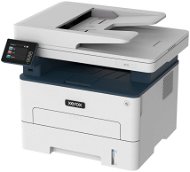
Interested in reviews of Xerox B235DNI? It got 4.2 out of 5 stars from our customers. Find specific customer reviews of Xerox B235DNI below. We will appreciate if you also share your experiences with Xerox B235DNI after purchasing.
Verified purchase - review from a price comparison website
Quality, satisfaction with the printer
0 ×Report
Automatic translation
Ufa auto s.r.o., Jihlava 1
Rated 29/10/2025, variant Xerox B235DNI
Verified purchase
price
small display
the printer was delivered without toner
some apps have a fee
0 ×Report
Automatic translation
Jan, Mnichovo Hradiště
Rated 27/10/2025, variant Xerox B235DNI
Verified purchase
I'm only evaluating after a few days of use, but it probably doesn't stand out compared to other printers in a similar price range. Installation is easy, clear touchscreen, prints, copies and scans, the software is clear and I had no problem getting to grips with it first time. I have it connected to my desktop PC by cable, but it's also connected to my home Wi-Fi network, so sending documents to print from my laptop and phone works. It prints fast enough and with good quality for my needs. I picked it up because of the combination of duplex printing, Wi-Fi and AirPrint and everything works seamlessly.
Double-sided printing
Wi-Fi + AirPrint
Price for the equipment
Handy display
They could also supply a data cable to the package, so that you don't have to find it separately, but I have a few of them lying around at home, so I'm just writing this here to have something.
0 ×Report
Automatic translation
Johana, Praha
Rated 06/09/2025, variant Xerox B235DNI
Verified purchase
Reliably serving for 3 years, for the price great.
0 ×Report
Automatic translation
Anonymous customer
Rated 22/07/2025, variant Xerox B235DNI
Verified purchase
there are problems during installation: admin password (probably have to wait X minutes after changing), paper is preset in the driver with a nonsensical header, sometimes Xerox and Microsoft are switched in the PC during installation
excellent for the price
Ethernet, wifi
mobile setup for "lame"
quality scanning and printing
for printing lower hundreds of pages per month + 10 scans and copies it is ideal
the document feeder is not duplex
the manual print feeder is just a "hole" for 1 paper, where it is necessary to hold
scanning is quite slow, especially at higher resolutions
small display to operate mainly copying is only for occasional work
0 ×Report
Automatic translation
Jaroslav, Dolnî Dobrouč
Rated 09/07/2025, variant Xerox B235DNI
Verified purchase - review from a price comparison website
price/performance
0 ×Report
Automatic translation
Company
Rated 24/06/2025, variant Xerox B235DNI
Verified purchase
In this price range up to 5k probably the best equipment what the market offers. The only thing missing is a duplex ADF feeder, but it's not that necessary.
Not yet verified, but the motivation was the low cost of printing, half that of HP.
unable to install driver on current Windows 11, Xerox Smart Start program gets stuck when "getting system information". Neither from the web nor from the CD, everything behaves the same. Firewall off. Unfortunately, there is no other way to get a driver specifically for this printer. The way Xerox support works is that you have to register the product first before anyone starts talking. The Windows 11 universal driver will allow printing, but that's it. The scan driver works.
0 ×Report
Automatic translation
Roman, Hovorčovice
Rated 14/06/2025, variant Xerox B235DNI
Verified purchase - review from a price comparison website
Noisier than the B215
0 ×Report
Automatic translation
Jan, Hrušovany u Brna
Rated 07/06/2025, variant Xerox B235DNI
Verified purchase
prints, scans
just a short power outage and the printer forgets the WiFi password
WiFi password can be set on the 5x3 cm display using the virtual QWERTY keyboard, i.e. that if your fingers are wider than 5mm, you have no idea what character the printer has drawn.
after entering the password, it takes 3 minutes before the printer reports that the password is invalid
The Dalai Lama would lose his nerve with the constant adjustments.