


24" Samsung S6 S60D


Don't like the alternatives? Choose from the full product list



24" Samsung S6 S60D
This 24" Samsung LCD monitor allows you to work in Quad HD (2560 × 1440) resolution. Its IPS panel has excellent colour reproduction, lower contrast, and the image remains just as high-quality even when changing the viewing angle. With an IPS panel, there's also minimal risk of burn-in, so it will last you a long time. Thanks to HDR, more details are rendered, with greater image depth and higher contrast, which corresponds to what the human eye sees. The matte surface of the display minimises light reflections in the room and helps to block light from the window. Thanks to the standard 16:9 aspect ratio, you can easily open, for example, a text document next to a graphics editor and work with the windows effectively. The maximum brightness of 350 cd/m² is practical for working in an environment without harsh sunlight and is also suitable for spaces that are not too brightly lit. It can be mounted on a wall or a stand using a 100×100 VESA mount. This makes it easy to organise a workspace with several monitors.
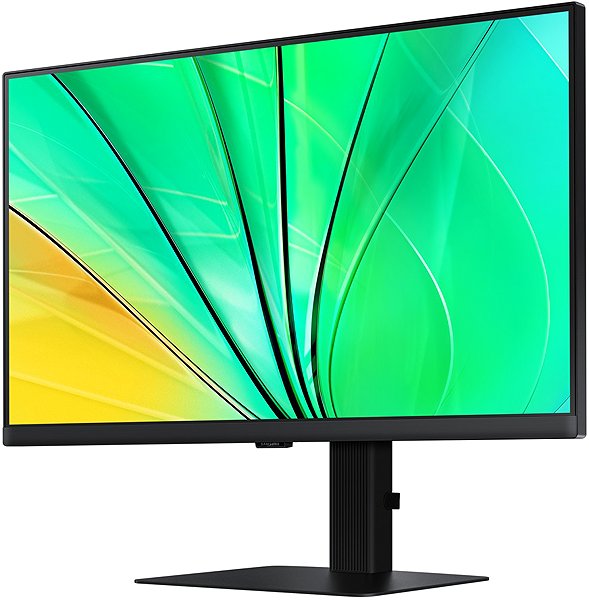
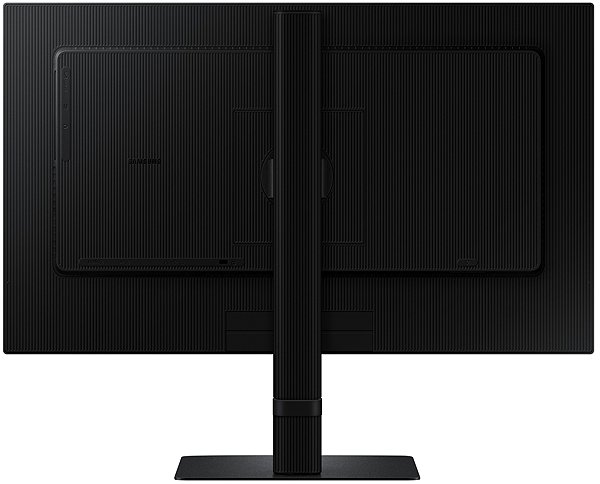
Key Features of the 24" Samsung S6 S60D Monitor
- Work efficiently with this 24" Samsung LCD monitor with Quad HD (2560 × 1440) resolution
- It uses an IPS panel to display colours with a refresh rate of up to 100 Hz and a response time of 5 ms
- The matte-finish display minimises reflections and reduces eye strain
- The standard 16:9 aspect ratio provides you with accurate image reproduction
- The monitor is equipped with LED backlighting
- Maximum brightness of 350 cd/m² is adapted for working away from the sun and in less-lit rooms
- Monitor with a flat design
The Samsung Monitor Boasts Interesting Properties and Functions
The 24" IPS PC monitor has a flat design, which is ideal if you plan to use multiple monitors simultaneously. It is equipped with a filter that reduces the transmission of blue light and a Flicker-free function that reduces the frequency of monitor flicker. This can help reduce eye fatigue and improve sleep quality. PiP (Picture in Picture) allows a small window with a second image or video to be displayed on the main screen. This way, you can easily switch between the main image and the smaller embedded window without interrupting the main activity on the screen. You can easily switch between two sources and view them simultaneously. The Picture-by-Picture (PbP) function allows you to compare data and work with different applications on two separate screens. You can tilt the monitor and adjust it to the required height so that its top side corresponds to eye level, helping to maintain correct posture, thus saving your cervical spine and preventing scoliosis. The tilt option will be particularly useful for those who work standing up. The Pivot function allows for easy 90° rotation of the monitor, which is practical for traders, programmers, and data analysts using a spreadsheet editor.
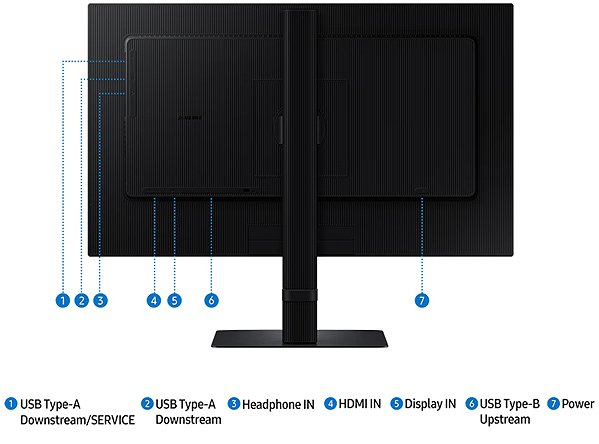
The Samsung monitor will delight you with its features
You can use HDMI and DisplayPort to connect a laptop or computer to the monitor. If your computer lacks a suitable connector, you can expand connectivity by purchasing a compatible port replicator. A port replicator will also be useful for connecting two monitors. In addition to the monitor itself, the package also includes an HDMI cable.
Choose a monitor based on native contrast and colour coverage
The Samsung monitor has a native contrast of 1000:1. The native contrast ratio characterises the difference between the brightest and darkest points a monitor can display. If a monitor has a contrast ratio of 3000:1, it means that the brightest point (white) is 3000× brighter than the darkest point (black). The sRGB colour coverage determines what percentage of colours from this colour space the monitor is able to display. sRGB is advantageous because it is a common colour space found on most monitors. The sRGB colour coverage of this monitor is 99%. It doesn't cover the entire natural colour spectrum, but this may not be a factor when working outside of graphics.
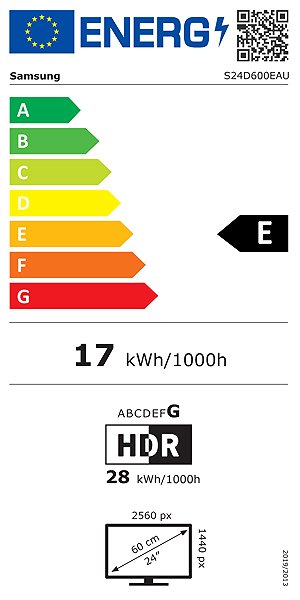
Information on the energy label of monitors:
- The header indicates the manufacturer and model of the monitor
- The scale of energy classes (left), the specific energy class of the product (right)
- kWh/1000h: energy consumption in kilowatt-hours per 1000 hours of operation
- SDR kWh/1000h: energy consumption in SDR mode in kilowatt-hours per 1000 hours of operation
- HDR kWh/1000h: energy consumption in HDR mode in kilowatt-hours per 1000 hours of operation
- Pixels: vertical and horizontal display resolution (2560 × 1440 px)
- Units in inches and centimetres: screen screen size
__________________________________________________________________
After scanning the QR code, you will be redirected to the European EPREL database, where you will see the display type, the technology used in its production (e.g., LCD, QLED), and other monitor specifications.
screen size:
24"
Colour coverage (sRGB):
99%
Graphics interface:
HDMI and DisplayPort
Graphics interface standards:
DisplayPort 1.4 and HDMI 2.0
Energy class in SDR mode:
E
Consumption in SDR mode:
17 kWh/1000h
Energy class in HDR mode:
G
Consumption in HDR mode:
28 kWh/1000h
Dimensions:
53.59 × 54.07 × 22 cm (h×w×d)
Weight:
5.4kg
Specifications
Display diagonal and resolution
Construction
Panel and screen technology
Aspect Ratio
Backlight and colour
Connection
Colour gamut
Features and functions
Colour
Dimensions and weight
Packaging
Energy specifications

Samsung Electronics Czech and Slovak, s.r.o., V parku 2323/14, Chodov, 148 00 Praha 4, 800 726 786, [email protected]
Creating a better world – the immodest vision which has driven Samsung since its inception in 1938. The courage to invest in the development of new technologies is typical for the company, as evidenced by a series of visionary solutions. Currently, Samsung is the largest group of companies in South Korea and the third largest worldwide conglomerate by revenue.
Samsung consumers associate the brand with high-quality consumer electronics. It is known for its Galaxy series, one of the best and most sought after mobile phones in its class. One must also mention Samsung TVs, where the company has long been at the cutting edge in technology and quality. The competence of the company is much broader. It is active in machinery and heavy industry, chemicals, construction, retail, and financial services.
Specifications can be changed without notice. Images are for illustrative purposes only.
