How to shop on Alza.hu?
This simple guide provides all the essential information you need for shopping.
Selecting a product
You can search for products by entering the name of a specific item, manufacturer or product type in the search box or by using the category bar in the menu.
Adding products to cart and placing an order
Once you have added products to your cart, the estimated delivery time will be displayed. You can then choose the most suitable payment and shipping option, and learn more about our services.
Delivery
We will keep you continuously updated on the status of your order, so you can easily track your package. Upon delivery, if you notice any defects or damage, please inform the courier.
complete
Returns & claims
For the fastest claim settlement possible, we recommend contacting an authorised service centre, but you can also make a warranty claim with us. We are also happy to arrange any post-warranty repairs or maintenance services.
Other
More information you may appreciate
FAQ
- Services
- Digital content
- Orders
- Warranty claims
-
How can I tell which service applies to a specific product?
After you add the product to the cart, the available services are displayed automatically.
-
Is it possible to purchase extended warranty retroactively?
No, unfortunately, the extended warranty cannot be purchased retroactively.
-
Is it possible to purchase Instant Replacement after purchasing a product?
The Instant Replacement service cannot be purchased after the original sale.
-
How do you deal with product replacement in-store if the product is not in stock?
Product replacement is settled within a maximum of three days.
-
If I order First Start service, will it have any effect on the delivery time?
If you order your product with First Start service by 12:00, the product will be delivered the next day. For orders placed after 12:00, delivery will take place on the second or third day after the order is placed.
-
How do you calculate the number of customers currently interested in a product?
We show the total number of visitors who have viewed the product on that day, from 00:00 up to the time of your visit.
-
How do you calculate the total number of units purchased today / this week for a given product?
To calculate the “purchased today” figure, we divide the number of units sold over the past 14 days by 14. Similarly, to calculate the "purchased this week" figure, we divide the same number by 2.
-
Which country do the calculation data come from?
We aggregate data from all countries where Alza operates. As an international company, we aim to provide our customers with the most comprehensive overview possible of the products we sell.
-
How do we ensure security and protect personal data?
At Alza.hu, we place great emphasis on our customers’ online security and the protection of their personal data, which is why we have prepared a detailed guide containing all the important information you need.
-
How does Alza approach advertising?
For detailed information about advertising, please visit our informational article.
-
How do I receive any electronic goods that I purchased?
After your order has been paid for, the product will be sent to your e-mail address.
-
Do I need to be a registered customer to purchase electronic goods?
Yes, you need to be a registered customer.
-
I cannot download electronic goods, what should I do?
If the order is paid and the licence cannot be downloaded, we kindly ask you to contact our customer line at 06 1 701 1111. We apologise for any inconvenience.
-
The purchased license is not what I expected, can I return it?
Unfortunately, electronic goods fall into the category of goods that cannot be returned.
-
How can I check the status of my order?
You can view the status of your order here.
-
Do I need to register in order to make a purchase?
No, you can shop without registering.
-
How will I be notified when my order is ready for pick up?
You will receive an SMS notification and an alert in the Alza app when your product is ready for pick up.
-
If I can’t pick up my order on time, can the reservation be extended?
You can extend the holding period of your order in your Alza account under the order details. If this option is not available, unfortunately we are unable to extend the reservation any further.
-
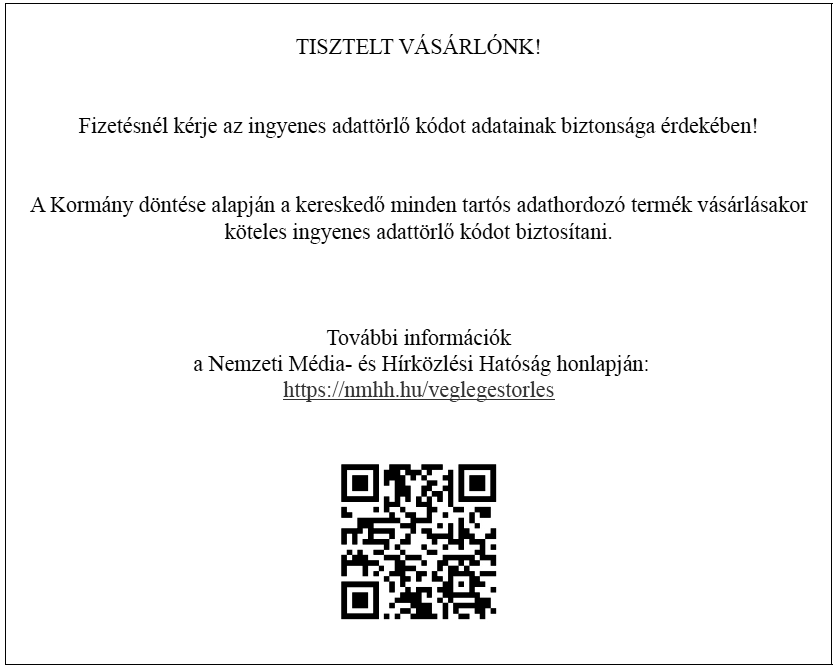
What is the data wipe service and where can I find the data wipe code?
Based on a decision by the Hungarian government, retailers are required to provide a free data wipe code with every purchase of durable data storage products. You can find your free data wipe code by clicking here.
-
The product I purchased is not working as intended.
Please submit a warranty claim online in your account and describe the issue in as much detail as possible. You can then simply place the product in an AlzaBox, drop it off in person at one of our physical stores, or send it by post, but please include a cover letter. You can find detailed instructions here. If the defect occurs within the 30-day return period, we will refund your purchase or, upon request, replace the product.
-
Can I return a product without giving a reason?
Yes, you can return the product without giving a reason within 30 days of purchase. However, the product must be in an undamaged condition upon arrival. Details about returning products can be found in Section IV of our General Terms and Conditions.
-
How do I submit a warranty claim?
If a product you ordered from us is not functioning properly, you can file a warranty claim as follows: First, check whether the product is covered by an official authorised service center in Hungary. Warranty claims handled by official service centers are typically resolved faster than those initiated with the retailer. If there is no authorised representation in Hungary, or if you prefer to file the claim directly with us, you may do so in our physical stores or by sending the product to our address. More detailed information is available here.
-
Where should I send the product for warranty claim?
You can send the product to: Alza.hu - Reklamáció 1134 Budapest, Róbert Károly krt. 54-58.
-
What do I need to include with the warranty claim?
Please include the complete product being claimed, a copy of the invoice, and—if sending by post—a cover letter describing the issue in detail. If the product comes with accessories, please include these as well, as they may be the source of the issue or may be needed for a thorough examination of the device. For TVs, always include the stand, as the screen alone can be easily damaged during transport.
-
If there is an issue with one part of the ordered product, do I need to bring the entire product with me?
Yes, we do not handle individual components separately, so please bring the entire product with you.
-
Do I need the original product packaging?
The original packaging is not required, but can be useful for transporting the product.
-
How long does the warranty claim process take?
We handle warranty claims as quickly as possible. However, based on the conditions of the warranty process, it must be resolved within a maximum of 30 days from receipt of the product. Unfortunately, we cannot provide an exact timeline.
-
Is it possible to expedite the warranty claim process?
If you need your claim to be resolved immediately, you have to purchase our Instant Replacement service. In other cases, expediting the process is not possible.
-
Can a relative or acquaintance handle the warranty claim on my behalf?
Yes, you may designate another person as a contact. Authorisation can be provided over the phone or by completing the contact form. The authorised person must also have the documentation proving the purchase.
If you made a purchase as a business customer, the credit notification will be sent to the person listed during registration. -
Will I lose my data on my device if I send it for repairs?
Yes, it is very likely. If the device is repairable, the service center usually resets it to factory settings to rule out any potential impact from third-party apps. Therefore, we recommend regularly backing up your data, not only before submitting a warranty claim. Our article How to back up or restore data on your phone provides a detailed guide on how to easily back up data on different types of devices.
-
The official service center has told me that the device cannot be repaired. What should I do?
Please contact us via the customer service form. Remember to attach a clear scanned or photographed copy of the service report. After verifying the document with the supplier, we will issue a credit for the refund of the product’s purchase price.